

1. Fill과 Gradient
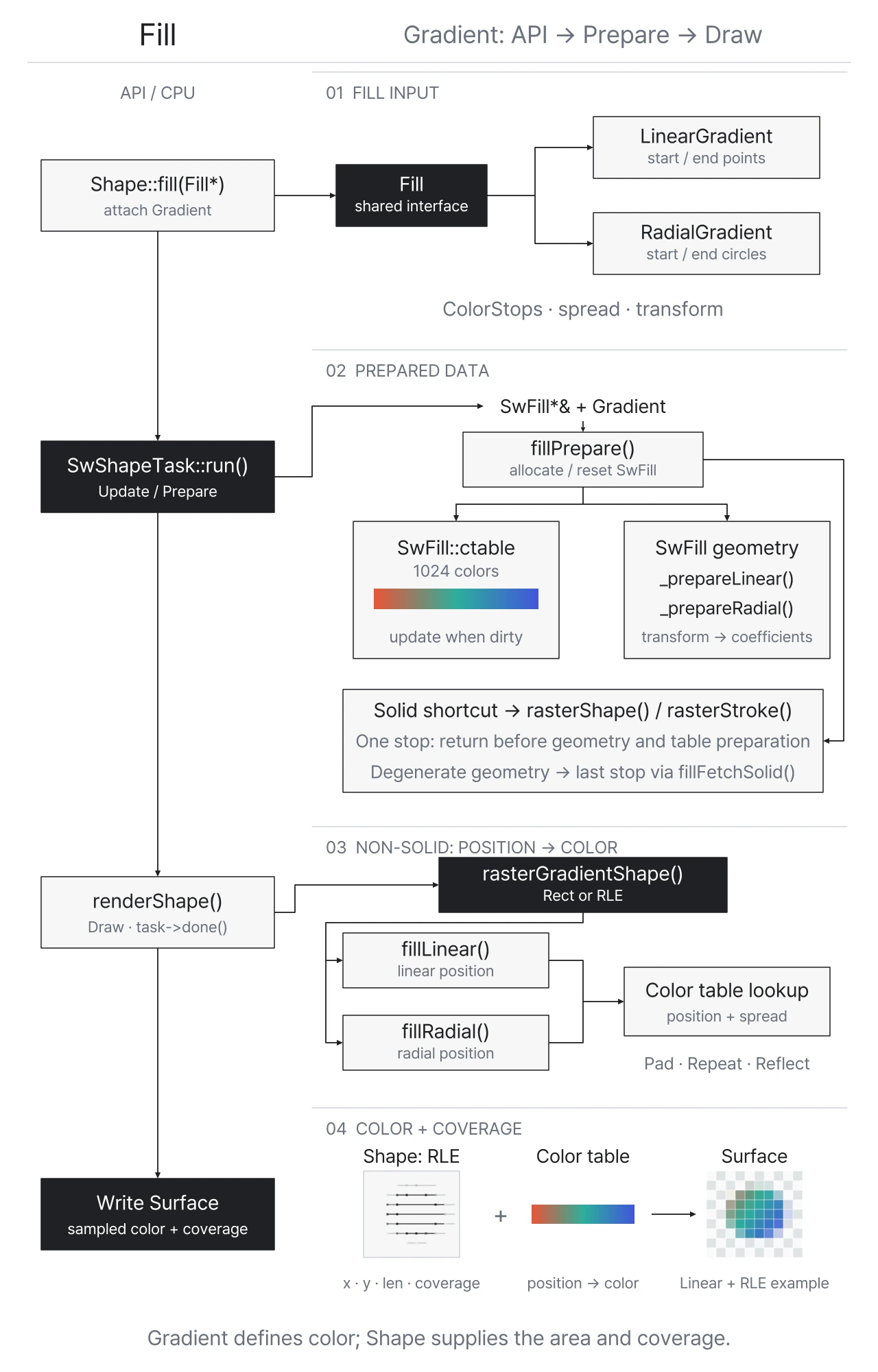
Shape는 단색 RGBA를 직접 보관하거나 Fill 객체를 참조할 수 있습니다. 단색은 모든 위치에서 같은 source 색을 사용하고, Gradient는 위치를 color table의 index로 변환해 서로 다른 색을 읽습니다. 이 글은 두 경로 중 Gradient의 준비와 조회를 중심으로 설명합니다.
Gradient는 Shape를 하나의 색으로 채우는 대신, 여러 색을 연속적으로 보간하여 채우는 방식입니다.
CPU Engine은 렌더링 전에 Color Stop 사이의 색을 보간한 Color Table을 미리 생성합니다.
-
Color Stop: Gradient 구간의 위치(0.0~1.0)와 해당 위치의 색상을 정의-
Fill::ColorStop으로 색상과 offset을 표현하고,Fill::colorStops()로 Gradient에 설정// Fill::ColorStop /** * @brief A data structure storing the information about the color and its relative position inside the gradient bounds. */ struct ColorStop { float offset; /**< The relative position of the color. */ uint8_t r; /**< The red color channel value in the range [0 ~ 255]. */ uint8_t g; /**< The green color channel value in the range [0 ~ 255]. */ uint8_t b; /**< The blue color channel value in the range [0 ~ 255]. */ uint8_t a; /**< The alpha color channel value in the range [0 ~ 255], where 0 is completely transparent and 255 is opaque. */ }; // Fill::colorStops() /** * @brief Sets the parameters of the colors of the gradient and their position. * * @param[in] colorStops An array of ColorStop data structure. * @param[in] cnt The count of the @p colorStops array equal to the colors number used in the gradient. */ Result colorStops(const ColorStop* colorStops, uint32_t cnt) noexcept; /** * @brief Gets the parameters of the colors of the gradient, their position and number. * * @param[out] colorStops A pointer to the memory location, where the array of the gradient's ColorStop is stored. * * @return The number of colors used in the gradient. This value corresponds to the length of the @p colorStops array. */ uint32_t colorStops(const ColorStop** colorStops) const noexcept;
-
-
Color Table: Color Stop 사이의 색을 미리 보간한 1024개 항목의 lookup table(LUT).- 렌더링할 때는 색을 다시 계산하지 않고 이 테이블에서 조회
색상 테이블
색상과 위치를 바꾸고, 1,024개 항목에서 보간된 색을 확인하세요.
위 예제는 ColorStop 이 3개인 ColorTable을 보여줍니다. 실제 생성 흐름은 다음과 같습니다.
Canvas::Impl::update()
→ Paint::Impl::update()
→ ShapeImpl::update()
→ SwRenderer::prepare()
→ SwRenderer::prepareCommon()
→ TaskScheduler::request()
→ SwShapeTask::run()
→ fillPrepare()
→ _updateColorTable()- 렌더러는 Shape의 각 픽셀을 Gradient 내의 상대 위치
t로 변환하고,t에 해당하는 색을 Color Table에서 조회 - Linear와 Radial Gradient는 이
t를 계산하는 기준이 다름- Linear Gradient: 픽셀을 시작점과 끝점이 정의하는 축에 투영하여
t를 계산 - Radial Gradient: 픽셀이 시작 원과 끝 원 사이에서 차지하는 상대 위치로
t를 계산
- Linear Gradient: 픽셀을 시작점과 끝점이 정의하는 축에 투영하여
1.1 Fill Spread
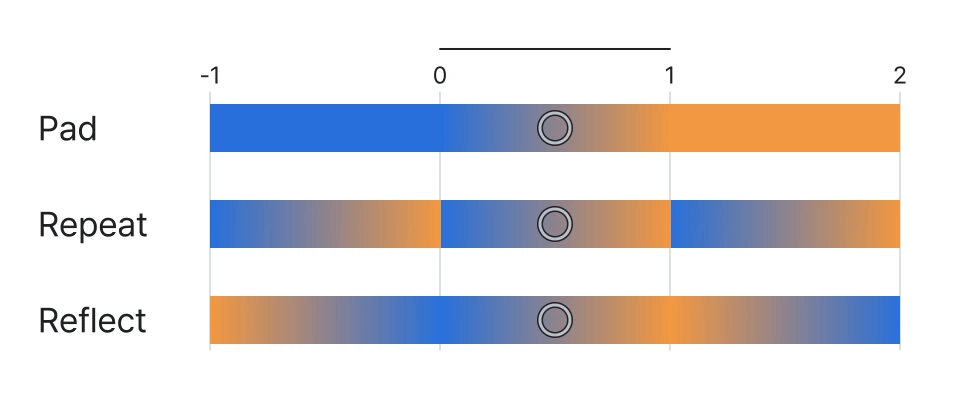
Fill::spread()는 Gradient 범위를 벗어난 영역을 채우는 방식을 설정 (기본값FillSpread::Pad)
// FillSpread
/**
 * @brief Enumeration specifying how to fill the area outside the gradient bounds.
 */
enum struct FillSpread : uint8_t
{
    Pad = 0, ///< The remaining area is filled with the closest stop color.
    Reflect, ///< The gradient pattern is reflected outside the gradient area until the expected region is filled.
    Repeat   ///< The gradient pattern is repeated continuously beyond the gradient area until the expected region is filled.
};

// Fill::spread()
/**
 * @brief Sets the FillSpread value, which specifies how to fill the area outside the gradient bounds.
 *
 * @param[in] s The FillSpread value.
 */
Result Fill::spread(FillSpread s) noexcept;
1.2. Linear Gradient
LinearGradient는 LinearGradient::gen()으로 생성하며, LinearGradient::linear()로 Gradient의 시작점과 끝점을 설정합니다.
/**
 * @brief Sets the linear gradient bounds.
 *
 * The bounds of the linear gradient are defined as a surface constrained by two parallel lines crossing
 * the given points (@p x1, @p y1) and (@p x2, @p y2), respectively. Both lines are perpendicular to the line linking
 * (@p x1, @p y1) and (@p x2, @p y2).
 *
 * @param[in] x1 The horizontal coordinate of the first point used to determine the gradient bounds.
 * @param[in] y1 The vertical coordinate of the first point used to determine the gradient bounds.
 * @param[in] x2 The horizontal coordinate of the second point used to determine the gradient bounds.
 * @param[in] y2 The vertical coordinate of the second point used to determine the gradient bounds.
 *
 * @note In case the first and the second points are equal, an object is filled with a single color using the last color specified in the colorStops().
 * @see Fill::colorStops()
 */
Result LinearGradient::linear(float x1, float y1, float x2, float y2) noexcept;
(x1, y1): 시작점p1(x2, y2): 끝점p2
Linear Gradient
시작점·끝점·샘플 픽셀을 움직이며 색이 결정되는 과정을 살펴보세요.
점을 드래그하거나 방향키로 이동
캔버스 전체를 덮는 Shape에 Linear Gradient를 적용한 결과입니다.
- P1/P2: Gradient 축의 시작점/끝점
- P: 샘플 픽셀
- 축의 색상 띠: Color Table
- 원형 마커: Color Stop
- 벡터 선:
p - p1 - 점선: 축으로의 사영
- 투영점:
p1 + t·d - 조회 마커: 범위 처리 후
u의 테이블 위치
t = dot(p - p1, d) / dot(d, d)d = p2 - p1:p1에서p2로 향하는 Gradient의 방향 벡터dot(p - p1, d): 픽셀p가 Gradient 축 방향으로 얼마나 떨어져 있는지dot(d, d): 축 길이의 제곱이다. 분자를 이 값으로 나누어 Gradient 축을 기준으로 한 상대 위치t = 0은p1,t = 1은p2,0 < t < 1은 두 점 사이를 뜻함
실제 Shape에 Linear Gradient를 적용하는 흐름은 다음과 같습니다.
Fill::ColorStop stops[] = {
    {0.0f, 255, 90, 54, 255},
    {0.5f, 255, 209, 102, 255},
    {1.0f, 23, 107, 255, 255}
};

auto gradient = LinearGradient::gen();
gradient->linear(130.0f, 105.0f, 550.0f, 255.0f);
gradient->colorStops(stops, 3);

auto shape = Shape::gen();
shape->appendRect(0.0f, 0.0f, 680.0f, 360.0f);
shape->fill(gradient);

canvas->add(shape);
호출이 성공하면 Shape::fill()에서 Gradient의 소유권이 Shape로, Canvas::add()에서 Shape의 소유권이 Canvas로 이전됩니다.
- 위 API 호출에서
LinearGradient::linear()는p1,p2를LinearGradient에 저장 Shape::fill()은 Gradient를 Shape에 연결- 이 시점에는 아직 SW Renderer의 계수가 계산되지 않음
- 초기 준비 또는 갱신 단계에서
_prepareLinear()가 호출되면, API로 설정한 값이 렌더링에 사용할SwFill::SwLinear구조체로 변환
- 초기 준비 또는 갱신 단계에서
struct SwLinear {
    float dx, dy;
    float offset;
};
초기 준비와 이후 갱신에서 SwLinear가 채워지는 흐름은 다음과 같습니다.
Canvas::update()
→ Canvas::Impl::update()
→ SceneImpl::update()
→ ShapeImpl::update()
→ SwRenderer::prepare()
→ SwRenderer::prepareCommon()
→ TaskScheduler::request()
→ SwShapeTask::run()
→ fillPrepare()
→ _prepareLinear()_prepareLinear()는 LinearGradient에서 p1, p2를 가져와 dx, dy, offset을 계산합니다.
bool _prepareLinear(SwFill* fill, const LinearGradient* linear, const Matrix& pTransform)
{
    float x1, x2, y1, y2;
    linear->linear(&x1, &y1, &x2, &y2);

    // d = p2 - p1
    fill->linear.dx = x2 - x1;
    fill->linear.dy = y2 - y1;

    // len = dot(d, d): Gradient 축 길이의 제곱
    auto len = fill->linear.dx * fill->linear.dx + fill->linear.dy * fill->linear.dy;

    if (len < FLOAT_EPSILON) {
        // p1과 p2가 같으면 마지막 Color Stop의 색을 사용하는 단색으로 처리한다.
        if (tvg::zero(fill->linear.dx) && tvg::zero(fill->linear.dy)) {
            fill->solid = true;
        }
        return true;
    }

    // dx, dy = d / dot(d, d)
    fill->linear.dx /= len;
    fill->linear.dy /= len;

    // t = dx * x + dy * y + offset에서 p1의 t가 0이 되도록
    // p1을 대입한 값인 dx * x1 + dy * y1을 빼준다.
    fill->linear.offset = -fill->linear.dx * x1 - fill->linear.dy * y1;

    // Shape와 Gradient의 transform에 대한 역변환을 계수에 미리 반영한다.
    const auto& transform = pTransform * linear->transform();

    Matrix itransform;
    if (!inverse(&transform, &itransform)) return false;

    fill->linear.offset += fill->linear.dx * itransform.e13 + fill->linear.dy * itransform.e23;

    auto dx = fill->linear.dx;
    fill->linear.dx = dx * itransform.e11 + fill->linear.dy * itransform.e21;
    fill->linear.dy = dx * itransform.e12 + fill->linear.dy * itransform.e22;

    return true;
}
준비가 끝난 뒤 실제 렌더링에서는 다음 흐름으로 fillLinear()가 호출됩니다.
Shape가 단순한 사각형이면 Rect 경로를, 일반 경로이면 RLE 경로를 사용합니다.
Canvas::draw()
→ Canvas::Impl::draw()
→ SceneImpl::render()
→ ShapeImpl::render()
→ SwRenderer::renderShape()
→ rasterGradientShape()
→ _rasterLinearGradientRect() 또는 _rasterLinearGradientRle()
→ FillLinear::operator()()
→ fillLinear()
아래는 일반 블렌딩 경로에서 사용하는 fillLinear() 함수 전체입니다.
void fillLinear(const SwFill* fill, uint32_t* dst, uint32_t y, uint32_t x, uint32_t len, SwBlenderA op, uint8_t a)
{
    //Rotation
    float rx = x + 0.5f;  //Pixel center x-coordinate
    float ry = y + 0.5f;  //Pixel center y-coordinate

    // 첫 픽셀의 상대 위치를 Color Table index로 변환한다.
    // dx * rx + dy * ry + offset은 dot(p - p1, d) / dot(d, d)와 같다.
    float t = (fill->linear.dx * rx + fill->linear.dy * ry + fill->linear.offset) * (SW_COLOR_TABLE - 1);

    // 스캔라인에서 다음 픽셀로 이동할 때 Color Table index의 변화량이다.
    float inc = (fill->linear.dx) * (SW_COLOR_TABLE - 1);

    // inc가 0이면 스캔라인에서 t가 변하지 않는다.
    // Color Table을 한 번만 조회해 구간 전체에 같은 색을 적용한다.
    if (tvg::zero(inc)) {
        auto color = _fixedPixel(fill, static_cast<int32_t>(t * FIXPT_SIZE));
        for (uint32_t i = 0; i < len; ++i, ++dst) {
            *dst = op(color, *dst, a);
        }
        return;
    }

    // t와 inc를 고정소수점 int32_t로 변환할 때의 오버플로를 방지한다.
    // FIXPT_BITS만큼의 변환 공간과 한 비트의 여유를 둔 안전 범위다.
    auto vMax = static_cast<float>(INT32_MAX >> (FIXPT_BITS + 1));
    auto vMin = -vMax;

    // 스캔라인 끝의 t가 안전 범위 안에 있는지 확인한다.
    auto v = t + (inc * len);

    // 안전 범위는 누적되는 t를 FIXPT_SIZE만큼 확대한 뒤에도
    // int32_t가 오버플로하지 않는 vMin ~ vMax 범위다.
    // 이 범위 안에서는 고정소수점으로 Color Table을 조회한다.
    if (v < vMax && v > vMin) {
        auto t2 = static_cast<int32_t>(t * FIXPT_SIZE);
        auto inc2 = static_cast<int32_t>(inc * FIXPT_SIZE);
        for (uint32_t j = 0; j < len; ++j, ++dst) {
            *dst = op(_fixedPixel(fill, t2), *dst, a);  // 고정소수점 index로 Color Table 조회
            t2 += inc2;
        }
    // 안전 범위를 벗어나면 부동소수점으로 Color Table을 조회한다.
    } else {
        uint32_t counter = 0;
        while (counter++ < len) {
            *dst = op(_pixel(fill, t / SW_COLOR_TABLE), *dst, a);  // 부동소수점 위치로 Color Table 조회
            ++dst;
            t += inc;
        }
    }
}
1.3. Radial Gradient
RadialGradient는 RadialGradient::gen()으로 생성, RadialGradient::radial()로 시작 원과 끝 원을 설정합니다.
/**
 * @brief Sets the radial gradient attributes.
 *
 * The radial gradient is defined by the end circle with a center (@p cx, @p cy) and a radius @p r and
 * the start circle with a center/focal point (@p fx, @p fy) and a radius @p fr.
 * The gradient will be rendered such that the gradient stop at an offset of 100% aligns with the edge of the end circle
 * and the stop at an offset of 0% aligns with the edge of the start circle.
 *
 * @param[in] cx The horizontal coordinate of the center of the end circle.
 * @param[in] cy The vertical coordinate of the center of the end circle.
 * @param[in] r The radius of the end circle.
 * @param[in] fx The horizontal coordinate of the center of the start circle.
 * @param[in] fy The vertical coordinate of the center of the start circle.
 * @param[in] fr The radius of the start circle.
 *
 * @retval Result::InvalidArguments in case the radius @p r or @p fr value is negative.
 *
 * @note In case the radius @p r is zero, an object is filled with a single color using the last color specified in the Fill::colorStops().
 * @note In case the focal point (@p fx and @p fy) lies outside the end circle, it is projected onto the edge of the end circle.
 * @note If the start circle doesn't fully fit inside the end circle (after possible repositioning), the @p fr is reduced accordingly.
 */
Result RadialGradient::radial(float cx, float cy, float r, float fx, float fy, float fr) noexcept;
(cx, cy),r: Color Stop offset1.0이 놓이는 끝 원의 중심과 반지름(fx, fy),fr: Color Stop offset0.0이 놓이는 시작 원의 중심과 반지름
Radial Gradient는 하나의 중심과 반지름만 사용하는 단순한 형태보다 범위가 넓습니다.
- 시작 원은 초점
(fx, fy)와 반지름fr로, 끝 원은 중심(cx, cy)와 반지름r로 정의 - 두 원 사이에서 원의 중심과 반지름이 함께 변하며 색이 보간됨
Radial Gradient
원과 초점을 움직이고, 세 단계로 샘플 픽셀의 색을 찾아보세요.
P는 색을 구할 픽셀입니다. 먼저 P − F를 구합니다.
점을 드래그하거나 방향키로 이동
중심 = F + t(C − F), 반지름 = fr + t(r − fr)
0 ≤ t ≤ 1이면 중심은 F–C 선분 위, 범위 밖이면 연장선 위에 있습니다.
|q − t·d|² = (fr + t·Δr)²
캔버스 전체를 덮는 Shape에 Radial Gradient를 적용한 결과입니다.
- P: 샘플 픽셀
- F / FR: 시작 원의 중심/반지름 (진행률 0)
- C / R: 끝 원의 중심/반지름 (진행률 1)
- t: 중심과 반지름을 보간해 P를 지나는 원을 찾은 진행률
- 2번 버튼: 원을 찾는 과정 다시 재생
- 각 픽셀에서
t를 구하려면 픽셀이 이 두 원 사이의 어느 지점에 놓이는지 계산이 필요 - SW Renderer는 이 관계를 이차방정식으로 만들고 해를 구함
- 한 스캔라인에서 다음 픽셀로 이동할 때 계수의 변화량을 누적하여, 매 픽셀마다 모든 항을 처음부터 다시 계산하지 않음
- 이차항이 매우 작은 특수한 경우에는 별도의 선형 계산 경로를 사용
API 호출 흐름은 다음과 같습니다.
Fill::ColorStop stops[] = {
    {0.0f, 255, 90, 54, 255},
    {0.5f, 255, 209, 102, 255},
    {1.0f, 23, 107, 255, 255}
};

auto gradient = RadialGradient::gen();
gradient->radial(365.0f, 185.0f, 145.0f, 310.0f, 145.0f, 20.0f);
gradient->colorStops(stops, 3);

auto shape = Shape::gen();
shape->appendRect(0.0f, 0.0f, 680.0f, 360.0f);
shape->fill(gradient);

canvas->add(shape);- 위 API 호출에서
RadialGradient::radial()은 시작 원과 끝 원을RadialGradient에 저장,Shape::fill()은 Gradient를 Shape에 연결 - 초기 준비 또는 갱신 단계에서
_prepareRadial()이 호출되면, 두 원의 정보가 렌더링에 사용할SwFill::SwRadial구조체로 변환
struct SwRadial {
    float a11, a12, a13;  // 화면 좌표를 Gradient 좌표로 옮기는 역변환 행렬
    float a21, a22, a23;
    float fx, fy, fr;     // 보정된 시작 원의 중심과 반지름
    float dx, dy, dr;     // 시작 원에서 끝 원까지의 중심과 반지름 변화량
    float invA, a;        // t를 구하는 이차방정식의 계수 A와 역수
};SwRadial이 채워지는 흐름은 Linear Gradient와 같으며 마지막에 _prepareRadial()을 호출하는 점이 다릅니다.
Canvas::update()
→ Canvas::Impl::update()
→ SceneImpl::update()
→ ShapeImpl::update()
→ SwRenderer::prepare()
→ SwRenderer::prepareCommon()
→ TaskScheduler::request()
→ SwShapeTask::run()
→ fillPrepare()
→ _prepareRadial()_prepareRadial()은 RadialGradient에서 두 원을 가져와 픽셀의 위치 t를 계산하는 데 필요한 계수와 역변환 행렬을 준비합니다.
bool _prepareRadial(SwFill* fill, const RadialGradient* radial, const Matrix& pTransform)
{
    float cx, cy, r, fx, fy, fr;
    radial->radial(&cx, &cy, &r, &fx, &fy, &fr);

    // 초점이 끝 원 밖에 있으면 안쪽으로 옮기고 시작 반지름을 조정한다.
    // 끝 원의 반지름이 너무 작아 유효한 Gradient를 만들 수 없으면 단색으로 처리한다.
    if ((fill->solid = !CONST_RADIAL(radial)->correct(fx, fy, fr))) return true;

    // 시작 원에서 끝 원까지 반지름과 중심이 변하는 양을 저장한다.
    fill->radial.dr = r - fr;
    fill->radial.dx = cx - fx;
    fill->radial.dy = cy - fy;
    fill->radial.fr = fr;
    fill->radial.fx = fx;
    fill->radial.fy = fy;

    // |p - (f + t·d)| = fr + t·dr을 풀 때 사용하는 이차항 A다.
    fill->radial.a = fill->radial.dr * fill->radial.dr
                   - fill->radial.dx * fill->radial.dx
                   - fill->radial.dy * fill->radial.dy;

    // A가 상대 정밀도 기준보다 작으면 나눗셈 안정성을 위해 최솟값으로 보정한다.
    auto precision = std::max(1e-5f,
                              std::max(fill->radial.dr * fill->radial.dr, 1.0f) * 1e-4f);

    if (fill->radial.a < precision) fill->radial.a = precision;
    fill->radial.invA = 1.0f / fill->radial.a;

    // Shape와 Gradient의 transform을 합친 뒤 역행렬을 저장한다.
    // fillRadial()은 이 행렬로 화면의 픽셀을 Gradient 좌표계로 옮긴다.
    const auto& transform = pTransform * radial->transform();

    Matrix itransform;
    if (!inverse(&transform, &itransform)) return false;

    fill->radial.a11 = itransform.e11;
    fill->radial.a12 = itransform.e12;
    fill->radial.a13 = itransform.e13;
    fill->radial.a21 = itransform.e21;
    fill->radial.a22 = itransform.e22;
    fill->radial.a23 = itransform.e23;

    return true;
}
준비가 끝난 뒤 실제 렌더링에서는 Rectangle 또는 RLE 경로를 거쳐 fillRadial()이 호출됩니다.
Canvas::draw()
→ Canvas::Impl::draw()
→ SceneImpl::render()
→ ShapeImpl::render()
→ SwRenderer::renderShape()
→ rasterGradientShape()
→ _rasterRadialGradientRect() 또는 _rasterRadialGradientRle()
→ FillRadial::operator()()
→ fillRadial()
void fillRadial(const SwFill* fill, uint32_t* dst, uint32_t y, uint32_t x,
uint32_t len, SwBlenderA op, uint8_t a)
{
// 이차항 A가 매우 작으면 이차식을 선형식으로 단순화해 t를 구한다.
if (fill->radial.a < RADIAL_A_THRESHOLD) {
auto radial = &fill->radial;
// 스캔라인 첫 픽셀의 중심을 Gradient 좌표계로 역변환한 뒤
// 시작 원의 중심을 원점으로 하는 상대 좌표를 만든다.
auto rx = (x + 0.5f) * radial->a11
+ (y + 0.5f) * radial->a12 + radial->a13 - radial->fx;
auto ry = (x + 0.5f) * radial->a21
+ (y + 0.5f) * radial->a22 + radial->a23 - radial->fy;
for (uint32_t i = 0; i < len; ++i, ++dst) {
// 두 원의 관계를 나타내는 식에서 현재 픽셀의 위치 t를 구한다.
auto x0 = 0.5f * (rx * rx + ry * ry - radial->fr * radial->fr)
/ (radial->dr * radial->fr + rx * radial->dx + ry * radial->dy);
// t에 해당하는 Color Table 색을 조회하고 Destination과 Alpha Blending한다.
*dst = op(_pixel(fill, x0), *dst, a);
// 화면에서 x가 한 픽셀 이동한 값을 역변환 좌표에 누적한다.
rx += radial->a11;
ry += radial->a21;
}
} else {
float b, deltaB, det, deltaDet, deltaDeltaDet;
// 첫 픽셀의 이차식 계수와 다음 픽셀에서 더할 변화량을 계산한다.
_calculateCoefficients(fill, x, y, b, deltaB, det, deltaDet, deltaDeltaDet);
for (uint32_t i = 0; i < len; ++i, ++dst) {
// 이차방정식의 해 t = sqrt(det) - b로 Color Table을 조회한다.
*dst = op(_pixel(fill, sqrtf(det) - b), *dst, a);
// 다음 픽셀은 미리 구한 변화량을 누적해 계수를 갱신한다.
det += deltaDet;
deltaDet += deltaDeltaDet;
b += deltaB;
}
}
}1.4. RLE + FillGradient
RLE Gradient Fill
한 픽셀씩 또는 span 단위로 진행하며 Gradient가 채워지는 과정을 확인하세요.
RLE 로 구성된 Shape 에 Gradient 를 적용하는 예제입니다.
1.5 Gradient AA (Repeat)
Repeat 경계 Anti-Aliasing
반복 길이와 방향을 바꾸며 경계 보간 전후를 비교하세요.
p1–p2 길이Linear Gradient의 한 반복 주기
initial margin = floor(800 / 72) = 11 entriesColor Table 전체
_applyAA()Repeat 경계 확대
_applyAA()- initial margin
- 11 entries
- begin margin
- 11 entries
- end margin
- 11 entries
전체 Color Table 아래에서1023 → 0 경계와 실제로 교체되는 margin을 확대해 비교할 수 있다.
2. Conic Gradient
Conic Gradient도 color table을 사용하지만 각도 경계가 다시 만나는 seam에서 별도 AA 처리가 필요합니다. 구현 과정과 품질 개선은 Conic Gradient seam AA 이슈 사례로 분리했습니다.