

1. Overview — API에서 준비된 RenderData까지
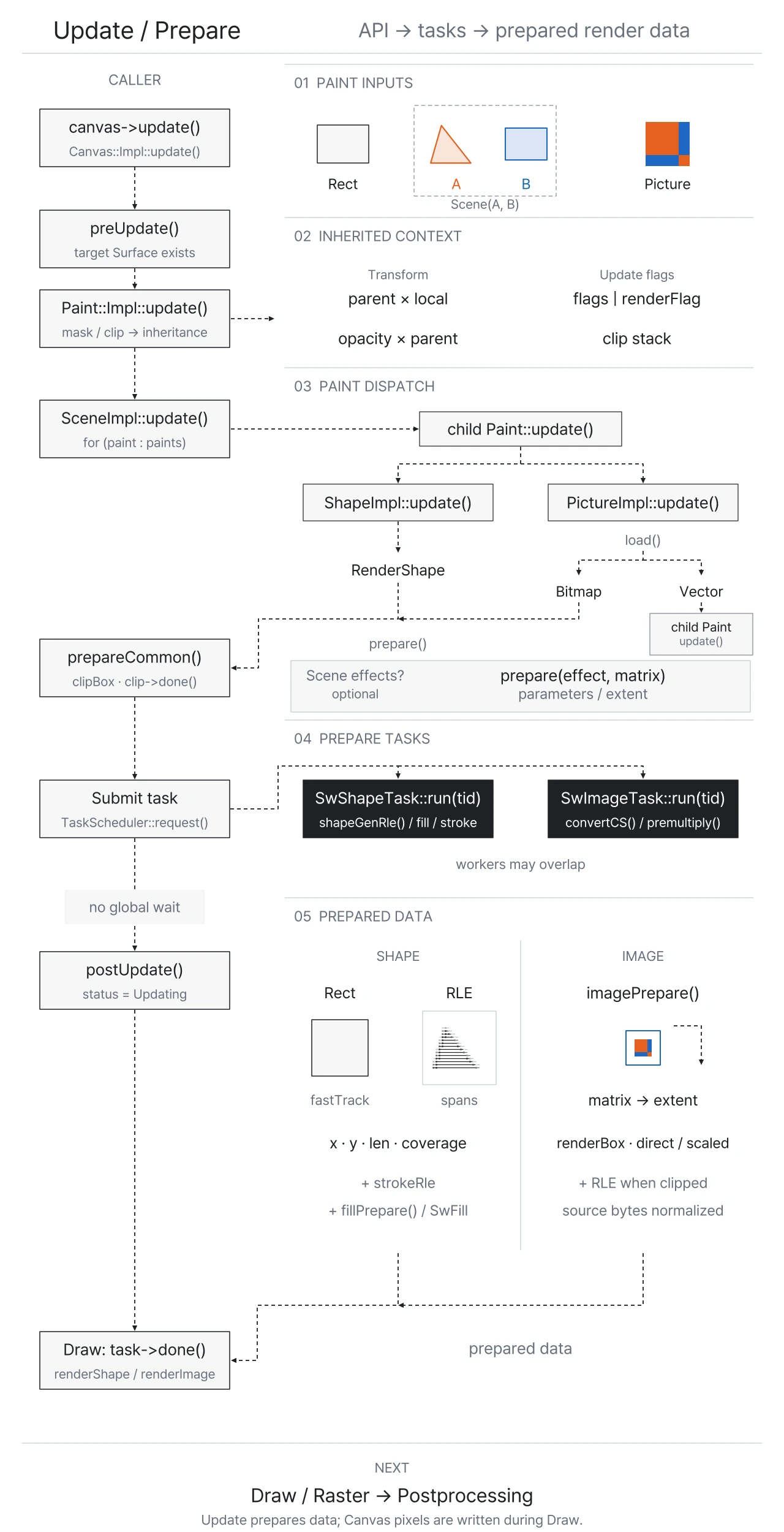
Canvas의 최상위 Scene부터 자식 Paint를 방문하며 변환·opacity·Clip을 전달합니다. SW Renderer는 Paint별 Task를 만들거나 재사용하고, Worker는 다음 Draw가 읽을 영역과 렌더링 데이터를 준비합니다.
- Shape: 변환된 Outline → bbox → Rect 또는 RLE, 필요하면 Gradient·Stroke 데이터 준비
- Picture: Bitmap은 Image Task로, SVG 같은 벡터는 내부 Paint 순회로 연결
- Scene effect: 이 단계에서는 Effect 파라미터를 준비하고, 실제 Surface 처리는 같은
draw()안에서 자식 Raster 뒤에 수행 — 준비 경로 - 완료 시점:
update()반환 뒤에도 Task가 실행될 수 있으며,renderShape()·renderImage()가done()으로 기다린 뒤 결과 사용
코드 보기: 02. Canvas Update · Scene 순회 · Task 요청
호출 흐름
canvas->update()
-> Canvas::Impl::update()
-> Paint::Impl::update()
-> SceneImpl::update()
-> child Paint::Impl::update()
-> ShapeImpl::update() / PictureImpl::update()
-> SwRenderer::prepare()
-> SwRenderer::prepareCommon()
-> TaskScheduler::request()Canvas::Impl::update(), SceneImpl::update()
// Canvas::Impl::update()
auto m = tvg::identity();
PAINT(scene)->update(renderer, m, clips, 255, flag);

// SceneImpl::update()
for (auto paint : paints) {
    PAINT(paint)->update(renderer, transform, clips, opacity, flag, false);
}
Inherited Context — Paint::Impl::update()
Overview의 Transform·Opacity·UpdateFlags·Clip Stack은 각 Paint의 update() 인자로 전달됩니다. 아래는 네 단계로 나뉜 전체 함수입니다.
| Context | 현재 Paint에서 반영하는 값 |
|---|---|
| Transform | 부모 행렬 pm과 현재 행렬 tr.m을 pm * tr.m으로 결합 |
| Opacity | 전달받은 opacity와 this->opacity를 MULTIPLY()로 결합 |
| UpdateFlags | 부모의 flag와 현재 renderFlag를 OR로 병합 |
| Clip Stack | 일반 Clip의 RenderData를 clips.push()로 추가하고, 타입별 Update 후 pop()으로 복원. Fast path는 viewport를 사용 |
RenderData Paint::Impl::update(RenderMethod* renderer, const Matrix& pm,
                              Array<RenderData>& clips, uint8_t opacity,
                              RenderUpdateFlag flag, bool clipper)
{
    // 부모 flag와 현재 Paint의 변경 flag를 함께 확인합니다.
    bool ret;
    PAINT_METHOD(ret, skip((flag | renderFlag)));

    if (ret) return rd;

    cmpFlag = CompositionFlag::Invalid;  //must clear after the rendering

    if (this->renderer != renderer) {
        if (this->renderer) TVGERR("RENDERER", "paint's renderer has been changed!");
        renderer->ref();
        this->renderer = renderer;
    }

    if (renderFlag & RenderUpdateFlag::Transform) tr.update();

    // 1. Composition Pre Processing — Mask 준비와 viewport fast path 판단
    RenderRegion viewport;
    auto compFastTrack = false;

    if (maskData) {
        auto target = maskData->target;
        auto method = maskData->method;
        PAINT(target)->ctxFlag &= ~ContextFlag::FastTrack;   //reset

        /* If the transformation has no rotational factors and the Alpha(InvAlpha) Masking involves a simple rectangle,
           we can optimize by using the viewport instead of the regular Alphaing sequence for improved performance. */
        if (target->type() == Type::Shape) {
            auto shape = static_cast<Shape*>(target);
            uint8_t a;
            shape->fill(nullptr, nullptr, nullptr, &a);
            //no gradient fill & no maskings of the masking target.
            if (!shape->fill() && !(PAINT(shape)->maskData)) {
                if ((method == MaskMethod::Alpha && a == 255 && PAINT(shape)->opacity == 255) ||
                    (method == MaskMethod::InvAlpha && (a == 0 || PAINT(shape)->opacity == 0))) {
                    viewport = renderer->viewport();
                    if ((compFastTrack = _compFastTrack(renderer, target, pm, viewport))) {
                        PAINT(target)->ctxFlag |= ContextFlag::FastTrack;
                    }
                }
            }
        }
        if (!compFastTrack) PAINT(target)->update(renderer, pm, clips, 255, flag, false);
    }

    // 2. Clipping — 일반 Clip은 준비된 RenderData를 상속받은 clips에 추가
    if (this->clipper) {
        auto pclip = PAINT(this->clipper);
        pclip->ctxFlag &= ~ContextFlag::FastTrack;   //reset
        viewport = renderer->viewport();
        if (!pclip->clipper && to<ShapeImpl>(this->clipper)->rs.strokeWidth() == 0.0f &&
            _compFastTrack(renderer, this->clipper, pm, viewport)) {
            pclip->ctxFlag |= ContextFlag::FastTrack;
            compFastTrack = true;
        } else {
            mark(RenderUpdateFlag::Clip);
            // clipper 자체는 별도의 빈 Clip Stack으로 준비합니다.
            Array<RenderData> noClip;
            clips.push(pclip->update(renderer, pm, noClip, 255, flag, true));
        }
    }

    // 3. Main Update — 현재 Paint까지 반영한 Context를 타입별 update()에 전달
    // Opacity: 부모에서 받은 값 × 현재 Paint의 값
    opacity = MULTIPLY(opacity, this->opacity);
    // Transform: pm * tr.m / UpdateFlags: flag | renderFlag / Clip Stack: clips
    PAINT_METHOD(ret, update(renderer, pm * tr.m, clips, opacity,
                             (flag | renderFlag), clipper));

    // 4. Composition Post Processing — 다음 형제 Paint를 위해 Context 복원
    // Update의 viewport / Clip Stack 복원 단계입니다.
    if (compFastTrack) renderer->viewport(viewport);
    else if (this->clipper) clips.pop();

    // 이번 Update에서 전달한 현재 Paint의 변경 flag를 비웁니다.
    renderFlag = RenderUpdateFlag::None;

    return rd;
}PAINT_METHOD는 실제 타입의 SceneImpl::update()·ShapeImpl::update()·PictureImpl::update() 등으로 연결합니다. Scene은 이 Context로 자식을 순회하며, 중간 합성이 필요한 경우 그룹 opacity를 보관하고 자식에게는 255를 전달합니다.
SwRenderer::prepare(), prepareCommon()
// SwRenderer::prepare(shape): 기존 Task를 재사용하고, done()으로 이전 작업의 완료를 동기화합니다.
auto task = static_cast<SwShapeTask*>(data);
if (task) task->done();
else {
    task = new SwShapeTask;
    task->rshape = &rshape;
}

// prepareCommon(): Task 속성 설정 이후
if (flags) {
    ARRAY_FOREACH(p, clips) {
        static_cast<SwTask*>(*p)->done();
    }
    TaskScheduler::request(task);
}
Worker 실행과 결과 사용
SwShapeTask::run(tid) / SwImageTask::run(tid)
-> Rect / RLE / Image 준비

canvas->draw(true)
-> …
-> SwRenderer::renderShape() / renderImage()
-> task->done()
-> Raster코드 보기: ShapeImpl::update() — Shape 준비
rs에 담긴 RenderShape와 기존 impl.rd, 상속된 Transform·Clip Stack·Opacity·UpdateFlags를 renderer->prepare()에 전달합니다. CPU에서는 SwShapeTask를 생성하거나 재사용하며, Rect/RLE·Gradient·Stroke의 실제 준비는 Task의 run()에서 수행합니다.
호출 흐름
canvas->update()
-> Canvas::Impl::update()
-> …
-> Paint::Impl::update()
-> ShapeImpl::update()
-> SwRenderer::prepare(rs, impl.rd, transform, clips, opacity, flag, clipper)
-> SwRenderer::prepareCommon()
-> TaskScheduler::request(task)

SwShapeTask::run(tid)
-> shapeGenRle()
-> _genOutline()
-> utilExport() · utilBBox()
-> rleRender()
-> _genRle() · _sweep()
-> _horizLine()
-> SwRle::spansTaskScheduler::request()는 worker가 있으면 작업을 큐에 넣고, 없으면 run(0)을 직접 호출합니다.
bool update(RenderMethod* renderer, const Matrix& transform,
            Array<RenderData>& clips, uint8_t opacity,
            RenderUpdateFlag flag, bool clipper)
{
    // 1. Shape의 중간 합성이 필요한지 판단합니다.
    if (needComposition(opacity)) {
        // 합성에 사용할 opacity를 보관하고, 내부 Fill·Stroke는 255로 준비합니다.
        this->opacity = opacity;
        opacity = 255;
    }

    // 2. Context를 전달하고, 준비 결과를 소유할 Task의 RenderData를 보관합니다.
    impl.rd = renderer->prepare(rs, impl.rd, transform, clips, opacity, flag, clipper);
    return true;
}
1. Task 생성·재사용 — SwRenderer::prepare()
RenderData SwRenderer::prepare
RenderData SwRenderer::prepare(const RenderShape& rshape, RenderData data,
                               const Matrix& transform, const Array<RenderData>& clips,
                               uint8_t opacity, RenderUpdateFlag flags, bool clipper)
{
    // 1. 기존 Task를 재사용하며, done()으로 이전 작업의 완료를 동기화합니다.
    auto task = static_cast<SwShapeTask*>(data);
    if (task) task->done();
    else {
        // 첫 준비에서는 Task를 만들고 원본 RenderShape를 연결합니다.
        task = new SwShapeTask;
        task->rshape = &rshape;
    }

    task->clipper = clipper;

    // 2. 상속 Context를 저장하고 필요한 작업을 요청합니다.
    return prepareCommon(task, transform, clips, opacity, flags, (opacity == 0 && !clipper));
}
2. Context 저장·작업 요청 — prepareCommon()
SwTask* SwRenderer::prepareCommon
SwTask* SwRenderer::prepareCommon(SwTask* task, const Matrix& transform,
                                    const Array<RenderData>& clips, uint8_t opacity,
                                    RenderUpdateFlag flags, bool ready)
{
    if (task->disposed) return task;

    // 1. run()이 사용할 변환·Clip·opacity·flag와 렌더 영역을 저장합니다.
    task->renderer = this;
    task->clipBox = RenderRegion::intersect(vport, {{0, 0}, {int32_t(surface->w), int32_t(surface->h)}});
    task->transform = transform;
    task->clips = clips;
    task->dirtyRegion = &dirtyRegion;
    task->opacity = opacity;
    task->nodirty = dirtyRegion.deactivated();
    task->flags[0] = flags;
    task->valid = false;

    // 2. Renderer의 Task 목록에 등록합니다. pushed는 worker 실행 여부가 아닙니다.
    if (!task->pushed) {
        task->pushed = true;
        tasks.push(task);
    }

    // 생략 조건이면 실행을 요청하지 않고 같은 Task를 반환합니다.
    if (task->ready(ready)) return task;

    if (flags) {
        // 3. 참조할 Clip의 준비 완료를 기다린 뒤 현재 Task를 요청합니다.
        ARRAY_FOREACH(p, clips) {
            static_cast<SwTask*>(*p)->done();
        }
        TaskScheduler::request(task);
    }

    return task;
}
3. 실제 준비 실행 — SwShapeTask::run()
void run(unsigned tid) override
{
    auto strokeWidth = validStrokeWidth(clipper);
    auto updateShape = flags[0] & (RenderUpdateFlag::Path | RenderUpdateFlag::Transform | RenderUpdateFlag::Clip);
    auto updateFill = flags[0] & (RenderUpdateFlag::Color | RenderUpdateFlag::Gradient | RenderUpdateFlag::Transform);

    // 1. Path·Transform·Clip 변경이면 Fill 영역과 Rect/RLE를 다시 준비합니다.
    if (updateShape) {
        shapeReset(shape);
        if (rshape->fill || rshape->color.a > 0 || clipper) {
            auto composite = clips.count > 0 ? true : false;
            if (!shapeGenRle(shape, rshape, transform, clipBox, curBox, renderer->mpool, tid, composite, antialiasing(strokeWidth))) {
                updateFill = false;
                curBox.reset();
            }
        }
    }
    // 2. Gradient가 있으면 색상 조회 데이터를 준비합니다.
    if (updateFill) {
        if (!fillPrepare(shape.fill, rshape->fill, transform, renderer->surface, opacity, (flags[0] & RenderUpdateFlag::Gradient))) goto dismiss;
    }
    // 3. Stroke의 Outline·RLE와 필요한 색상 데이터를 준비합니다.
    if (strokeWidth > 0.0f) {
        auto updateStroke = updateShape || (flags[0] & RenderUpdateFlag::Stroke);
        if (updateStroke && !shapeGenStrokeRle(shape, rshape, transform, clipBox, curBox, renderer->mpool, tid, renderer->antiAlias)) goto dismiss;
        auto ctable = flags[0] & RenderUpdateFlag::GradientStroke;
        if (ctable || flags[0] & RenderUpdateFlag::Transform) {
            if (!fillPrepare(shape.stroke->fill, rshape->strokeFill(), transform, renderer->surface, opacity, ctable)) goto dismiss;
        }
    } else {
        shapeDelStroke(shape);
    }

    // 임시 Outline 참조를 비웁니다. 생성된 rle·strokeRle는 Task에 남습니다.
    shapeDelOutline(shape);

    // 4. 준비된 Fill·Stroke RLE에 각 Clip을 적용합니다.
    ARRAY_FOREACH(p, clips) {
        auto clipper = static_cast<SwTask*>(*p);
        auto clipShape = clipper->clip(shape.rle);
        auto clipStroke = clipper->clip(shape.strokeRle);
        if (!clipShape && !clipStroke) goto dismiss;
    }

    // 5. 준비 결과를 유효 상태로 표시하고 변경 영역을 기록합니다.
    valid = true;
    if (!nodirty) dirtyRegion->add(prvBox, curBox);
    return;

dismiss:
    shapeReset(shape);
    rleReset(shape.strokeRle);
    invisible();
}
4. Outline·영역 → Fill·Stroke RLE
shapeGenRle()의 renderBox에는 Task의 curBox가 참조로 전달됩니다. Clip 합성이 없고 축에 나란한 Rect이면 fastTrack으로 RLE 생성을 생략합니다.
bool shapeGenRle(SwShape& shape, const RenderShape* rshape, const Matrix& transform,
                 const RenderRegion& clipBox, RenderRegion& renderBox,
                 SwMpool* mpool, unsigned tid, bool composite, bool antiAlias)
{
    // 1. Select the borrowed Shape path, or a pooled generated trim path.
    auto outline = _genOutline(rshape, mpool, tid, rshape->trimpath());
    if (!outline) {
        renderBox.reset();
        return false;
    }

    // 2. Transform을 적용하고 화면 좌표의 경계를 계산합니다.
    BBox bbox;
    utilExport(outline, transform, bbox);

    shape.outline = outline;
    shape.fastTrack = !composite && _axisAlignedRect(outline);

    // 3. viewport로 제한한 영역을 curBox와 shape.bbox에 저장합니다.
    if (!utilBBox(bbox, clipBox, renderBox, shape.fastTrack)) return false;
    shape.bbox = renderBox;

    // Rect fast path는 bbox를 사용하며 RLE를 새로 만들지 않습니다.
    if (shape.fastTrack) return true;

    // 4. 일반 경로는 coverage span을 만들고 그 SwRle를 shape.rle에 보관합니다.
    shape.rle = rleRender(shape.rle, outline, renderBox, mpool, tid, antiAlias);
    return shape.rle ? true : false;
}
bool shapeGenStrokeRle(SwShape& shape, const RenderShape* rshape,
const Matrix& transform, const RenderRegion& clipBox,
RenderRegion& renderBox, SwMpool* mpool,
unsigned tid, bool antiAlias)
{
shapeResetStroke(shape, rshape, transform, mpool, tid);
auto dash = (rshape->stroke->dash.length > DASH_PATTERN_THRESHOLD);
SwOutline* outline;
if (dash) outline = _genDashOutline(rshape, mpool, tid, rshape->trimpath());
// resuse outline generated by shape
else outline = shape.outline ? shape.outline : _genOutline(rshape, mpool, tid, rshape->trimpath());
if (!outline) return false;
// Stroke 경계를 구성한 뒤, 같은 RLE 생성 함수로 전달합니다.
if (!strokeParseOutline(shape.stroke, *outline)) return false;
BBox bbox;
outline = strokeExportOutline(shape.stroke, mpool, tid);
if (outline->path->empty()) return false;
utilExport(outline, transform, bbox);
if (!utilBBox(bbox, clipBox, renderBox, false)) return false;
// Fill의 shape.rle와 별도로 Stroke coverage를 보관합니다.
shape.strokeRle = rleRender(shape.strokeRle, outline, renderBox, mpool, tid, antiAlias);
return shape.strokeRle ? true : false;
}5. Pool·Band → SwRle — rleRender()
mpool->cell(tid)는 Cell 누적에 쓰는 임시 공간입니다. 성공한 Band를 _sweep()할 때 별도 SwRle::spans에 결과를 쌓고, 공간이 부족한 Band는 반으로 나누어 다시 시도합니다.
SwRle* rleRender(SwRle* rle, const SwOutline* outline, const RenderRegion& bbox,
                 SwMpool* mpool, unsigned tid, bool antiAlias)
{
    if (!outline) return nullptr;

    RleWorker rw;
    // 1. 이 실행의 tid에 해당하는 Cell Pool을 가져옵니다.
    auto cellPool = mpool->cell(tid);
    auto reqSize = uint32_t(std::max(bbox.w(), bbox.h()) * 0.75f) * sizeof(SwCell);  //experimental decision

    // grow by 1.25x and align to multiple of sizeof(SwCell)
    if (reqSize > cellPool->size) {
        cellPool->size = ((reqSize + (reqSize >> 2)) / sizeof(SwCell)) * sizeof(SwCell);
        tvg::free(cellPool->buffer);
        cellPool->buffer = tvg::malloc<SwCell>(cellPool->size);
    }

    // 2. Band별 cover·area 누적에 사용할 Worker 상태를 초기화합니다.
    rw.buffer = cellPool->buffer;
    rw.bufferSize = cellPool->size;
    rw.yCells = reinterpret_cast<SwCell**>(cellPool->buffer);
    rw.cells = nullptr;
    rw.maxCells = 0;
    rw.cellsCnt = 0;
    rw.area = 0;
    rw.cover = 0;
    rw.invalid = true;
    rw.cellMin = {bbox.min.x, bbox.min.y};
    rw.cellMax = {bbox.max.x, bbox.max.y};
    rw.cellXCnt = rw.cellMax.x - rw.cellMin.x;
    rw.cellYCnt = rw.cellMax.y - rw.cellMin.y;
    rw.outline = outline;
    rw.bandSize = rw.bufferSize / (sizeof(SwCell) * 2);
    rw.bandShoot = 0;
    rw.antiAlias = antiAlias;

    // 3. 최종 Span을 소유할 SwRle는 임시 Cell Pool과 별도로 유지합니다.
    if (!rle) rw.rle = new SwRle;
    else rw.rle = rle;
    rw.rle->spans.reserve(256);

    //Generate RLE
    constexpr auto BAND_SIZE = 40;

    Band bands[BAND_SIZE];
    Band* band;

    /* set up vertical bands */
    auto bandCnt = static_cast<int>((rw.cellMax.y - rw.cellMin.y) / rw.bandSize);
    if (bandCnt == 0) bandCnt = 1;
    else if (bandCnt >= BAND_SIZE) bandCnt = (BAND_SIZE - 1);

    auto min = rw.cellMin.y;
    auto yMax = rw.cellMax.y;
    int32_t max;

    for (int n = 0; n < bandCnt; ++n, min = max) {
        max = min + rw.bandSize;
        if (n == bandCnt -1 || max > yMax) max = yMax;

        bands[0].min = min;
        bands[0].max = max;
        band = bands;

        while (band >= bands) {
            rw.yCells = reinterpret_cast<SwCell**>(rw.buffer);
            rw.yCnt = band->max - band->min;

            // 4. 같은 Pool에서 행별 Cell 포인터 배열 뒤에 Cell 저장 공간을 배치합니다.
            int cellStart = sizeof(SwCell*) * (int)rw.yCnt;
            int cellMod = cellStart % sizeof(SwCell);

            if (cellMod > 0) cellStart += sizeof(SwCell) - cellMod;

            auto cellsMax = reinterpret_cast<SwCell*>((char*)rw.buffer + rw.bufferSize);
            rw.cells = reinterpret_cast<SwCell*>((char*)rw.buffer + cellStart);

            if (rw.cells >= cellsMax) goto reduce_bands;

            rw.maxCells = cellsMax - rw.cells;
            if (rw.maxCells < 2) goto reduce_bands;

            for (int y = 0; y < rw.yCnt; ++y)
                rw.yCells[y] = nullptr;

            rw.cellsCnt = 0;
            rw.invalid = true;
            rw.cellMin.y = band->min;
            rw.cellMax.y = band->max;
            rw.cellYCnt = band->max - band->min;

            // 5. Outline에서 Cell 누적에 성공한 Band만 coverage span으로 변환합니다.
            if (_genRle(rw)) {
                _sweep(rw);
                --band;
                continue;
            }

        reduce_bands:
            // 6. Pool이 부족하면 현재 Band를 반으로 나누어 재시도합니다.
            auto bottom = band->min;
            auto top = band->max;
            auto middle = bottom + ((top - bottom) >> 1);

            /* This is too complex for a single scanline; there must
               be some problems */
            if (middle == bottom) {
                rleFree(rw.rle);
                return nullptr;
            }

            if (bottom - top >= rw.bandSize) ++rw.bandShoot;

            band[1].min = bottom;
            band[1].max = middle;
            band[0].min = middle;
            band[0].max = top;
            ++band;
        }
    }
    if (rw.bandShoot > 8 && rw.bandSize > 16) {
        rw.bandSize = (rw.bandSize >> 1);
    }
    // shape.rle 또는 shape.strokeRle에 연결할 준비 결과입니다.
    return rw.rle;
}
6. Cell 누적 → coverage span 기록
_genRle()는 Outline을 선분·곡선으로 분해하며 Cell의 cover·area를 누적합니다. _sweep()는 이를 행별로 읽고, _horizLine()은 coverage를 계산해 인접 Span을 합치거나 새 Span을 기록합니다.
static bool _genRle(RleWorker& rw)
{
    if (!_decomposeOutline(rw)) return false;
    if (!rw.invalid && !_recordCell(rw)) return false;
    return true;
}
static void _sweep(RleWorker& rw)
{
if (rw.cellsCnt == 0) return;
for (int y = 0; y < rw.yCnt; ++y) {
auto cover = 0;
auto x = 0;
auto cell = rw.yCells[y];
// x 순서의 Cell을 따라 누적 cover와 경계 화소의 area를 계산합니다.
while (cell) {
if (cell->x > x && cover != 0) _horizLine(rw, x, y, cover * (ONE_PIXEL * 2), cell->x - x);
cover += cell->cover;
auto area = cover * (ONE_PIXEL * 2) - cell->area;
if (area != 0 && cell->x >= 0) _horizLine(rw, cell->x, y, area, 1);
x = cell->x + 1;
cell = cell->next;
}
if (cover != 0) _horizLine(rw, x, y, cover * (ONE_PIXEL * 2), rw.cellXCnt - x);
}
}static void _horizLine(RleWorker& rw, int32_t x, int32_t y, int32_t area, int32_t aCount)
{
x += rw.cellMin.x;
y += rw.cellMin.y;
//Clip Y range
if (y < rw.cellMin.y || y >= rw.cellMax.y) return;
// 1. 누적 면적을 coverage로 변환하고 FillRule을 적용합니다.
/* the coverage percentage is area/(PIXEL_BITS*PIXEL_BITS*2) */
auto coverage = static_cast<int>(area >> (PIXEL_BITS * 2 + 1 - 8)); //range 0 - 255
if (coverage < 0) coverage = -coverage;
if (rw.outline->fillRule == FillRule::EvenOdd) {
coverage &= 511;
if (coverage > 255) coverage = 511 - coverage;
} else {
//normal non-zero winding rule
if (coverage > 255) coverage = 255;
}
if (coverage == 0) return;
auto rle = rw.rle;
if (!rw.antiAlias) coverage = 255;
// 2. 같은 행에서 coverage가 같고 맞닿은 Span은 len을 늘려 합칩니다.
if (!rle->spans.empty()) {
auto& span = rle->spans.last();
if ((span.coverage == coverage) && (span.y == y) && (span.x + span.len == x)) {
//Clip x range
int32_t xOver = 0;
if (x + aCount >= rw.cellMax.x) xOver -= (x + aCount - rw.cellMax.x);
if (x < rw.cellMin.x) xOver -= (rw.cellMin.x - x);
span.len += (aCount + xOver);
return;
}
}
//Clip x range
int32_t xOver = 0;
if (x + aCount >= rw.cellMax.x) xOver -= (x + aCount - rw.cellMax.x);
if (x < rw.cellMin.x) {
xOver -= (rw.cellMin.x - x);
x = rw.cellMin.x;
}
//Nothing to draw
if (aCount + xOver <= 0) return;
// 3. 최종 RLE 원소 {x, y, len, coverage}를 기록합니다.
rle->spans.next() = {x, y, aCount + xOver, (uint8_t)coverage};
}Cell을 만드는 내부 경로: _decomposeOutline() → _lineTo()·_cubicTo() → _recordCell().
준비된 shape.rle·shape.strokeRle는 Task에 남고, 이후 renderShape()가 done()으로 완료를 확인한 뒤 사용합니다.
코드 보기: PictureImpl::update() — Bitmap·Vector 분기
load()에서 발생한 변경을 flag에 합친 뒤 Bitmap과 Vector를 구분합니다. Bitmap은 크기·origin을 반영한 행렬과 Filter를 Image 준비에 전달하고, Vector는 내부 Paint tree의 Update로 이어집니다.
호출 흐름
canvas->update()
-> Canvas::Impl::update()
-> …
-> Paint::Impl::update()
-> PictureImpl::update()
-> load() 결과를 flag에 병합

Bitmap
-> SwRenderer::prepare(bitmap, impl.rd, m, clips, opacity, filter, flag)

Vector
-> vector->pImpl->update(renderer, transform, clips, opacity, flag, false)bool update(RenderMethod* renderer, const Matrix& transform,
Array<RenderData>& clips, uint8_t opacity,
RenderUpdateFlag flag, TVG_UNUSED bool clipper)
{
// 1. 로드·콘텐츠 갱신으로 생긴 변경 flag를 합칩니다.
flag |= load();
if (flag == RenderUpdateFlag::None) return true;
// origin을 현재 Picture 크기에 맞는 이동량으로 변환합니다.
auto pivot = Point{-origin.x * float(w), -origin.y * float(h)};
// 2. Bitmap: 크기·origin을 행렬에 반영하고 Image 준비로 연결합니다.
if (bitmap) {
if (bitmap->cs == ColorSpace::Unknown) {
TVGERR("RENDERER", "Unknown colorspace picture data");
return false;
}
//Overriding Transformation by the desired image size
auto sx = w / loader->w;
auto sy = h / loader->h;
auto scale = sx < sy ? sx : sy;
auto m = transform * Matrix{scale, 0, pivot.x, 0, scale, pivot.y, 0, 0, 1};
// 기존 rd와 Filter를 함께 전달합니다. CPU에서는 SwImageTask를 받습니다.
impl.rd = renderer->prepare(bitmap, impl.rd, m, clips, opacity, filter, flag);
} else if (vector) {
// 3. Vector: 내부 Paint tree의 Update로 위임합니다.
if (resizing) {
loader->resize(vector, w, h);
resizing = false;
}
needComposition(opacity);
vector->blend(pImpl->blendMethod); //propagate blend method to nested vector scene
translateR(const_cast<Matrix*>(&transform), pivot);
return vector->pImpl->update(renderer, transform, clips, opacity, flag, false);
}
return true;
}코드 보기: imagePrepare() — 변환 판정 · Outline · 렌더 영역
SwImageTask::run()은 rasterConvertCS()와 rasterPremultiply()로 source 픽셀을 먼저 준비하고, 그 버퍼를 SwImage에 연결합니다. 이어서 필요한 경우 imagePrepare()가 기록한 direct·scaled·offset·scale과 렌더 영역을 이후 Draw의 Image Raster에서 사용합니다.
호출 흐름 — Bitmap 준비
canvas->update()
-> …
-> PictureImpl::update()
-> SwRenderer::prepare(bitmap, impl.rd, …)
-> SwRenderer::prepareCommon()
-> TaskScheduler::request(task)

SwImageTask::run(tid)
-> rasterConvertCS(source, renderer->surface->cs)
-> rasterPremultiply(source)
-> image.data · w · h · stride 연결
-> imagePrepare(image, transform, clipBox, curBox, mpool, tid)
-> Clip이 있으면 imageGenRle() · clipper->clip(image.rle)
1. Source 연결·준비 실행 — SwImageTask
SwRenderer::prepare(RenderSurface*, …)
RenderData SwRenderer::prepare(RenderSurface* surface, RenderData data,
                               const Matrix& transform, const Array<RenderData>& clips,
                               uint8_t opacity, FilterMethod filter, RenderUpdateFlag flags)
{
    // 기존 Task를 재사용하며, done()으로 이전 작업의 완료를 동기화합니다.
    auto task = static_cast<SwImageTask*>(data);
    if (task) task->done();
    else {
        task = new SwImageTask;
        // Picture의 RenderSurface를 source로 연결합니다.
        task->source = surface;
    }

    // Filter는 SwImage에, 변환·Clip·opacity·flag는 공통 SwTask에 저장합니다.
    task->image.filter = filter;
    return prepareCommon(task, transform, clips, opacity, flags, (opacity == 0));
}void run(unsigned tid) override
{
// 1. source의 채널 배치를 맞춘 뒤, 픽셀 자체의 알파를 RGB에 곱합니다.
rasterConvertCS(source, renderer->surface->cs);
rasterPremultiply(source);
// 2. 위 처리를 마친 픽셀 버퍼와 크기·stride를 SwImage에 연결합니다.
image.data = source->data;
image.w = source->w;
image.h = source->h;
image.stride = source->stride;
image.channelSize = source->channelSize;
image.alphaIgnored = source->alphaIgnored;
auto updateImage = flags[0] & (RenderUpdateFlag::Image | RenderUpdateFlag::Clip | RenderUpdateFlag::Transform);
auto updateColor = flags[0] & (RenderUpdateFlag::Color);
// 3. Image·Clip·Transform 또는 Color 변경으로 준비가 필요하고 보이는 경우입니다.
if ((updateImage || updateColor) && (opacity > 0)) {
if (updateImage) imageReset(image);
if (!image.data || image.w == 0 || image.h == 0) goto err;
// 채널·알파 처리 이후 변환 분류, Outline, curBox를 준비합니다.
if (!imagePrepare(image, transform, clipBox, curBox, renderer->mpool, tid)) goto err;
valid = true;
// 4. Clip이 있으면 Image RLE를 생성하고 각 clipper를 적용합니다.
if (clips.count > 0) {
if (!imageGenRle(image, curBox, renderer->mpool, tid, false)) goto err;
if (image.rle) {
ARRAY_FOREACH(p, clips) {
auto clipper = static_cast<SwTask*>(*p);
if (!clipper->clip(image.rle)) goto err;
}
if (!nodirty) dirtyRegion->add(prvBox, curBox);
return;
}
} else imageFree(image); // Clip이 없으면 Image RLE를 남기지 않습니다.
}
goto end;
err:
curBox.reset();
imageReset(image);
end:
if (!nodirty) dirtyRegion->add(prvBox, curBox);
}2. 채널 배치 변환 — rasterConvertCS()
지원하는 ARGB ↔ ABGR 변환에서 R·B 채널을 교환하고 source->cs를 갱신합니다. 변환 대상이 같은 ColorSpace이면 바로 반환합니다.
bool rasterConvertCS(RenderSurface* surface, ColorSpace to)
{
    // source에 대한 동시 변환을 보호하고, 같은 ColorSpace의 중복 처리를 생략합니다.
    ScopedLock lock(surface->key);
    if (surface->cs == to) return true;

    // ARGB/ABGR 채널 배치를 변환합니다. premultiply는 다음 함수에서 처리합니다.
    auto from = surface->cs;

    if (((from == ColorSpace::ABGR8888) || (from == ColorSpace::ABGR8888S)) && ((to == ColorSpace::ARGB8888) || (to == ColorSpace::ARGB8888S))) {
        surface->cs = to;
        return cRasterABGRtoARGB(surface);
    }
    if (((from == ColorSpace::ARGB8888) || (from == ColorSpace::ARGB8888S)) && ((to == ColorSpace::ABGR8888) || (to == ColorSpace::ABGR8888S))) {
        surface->cs = to;
        return cRasterARGBtoABGR(surface);
    }
    return false;
}static bool inline cRasterABGRtoARGB(RenderSurface* surface)
{
TVGLOG("SW_ENGINE", "Convert ColorSpace ABGR - ARGB [Size: %d x %d]", surface->w, surface->h);
// 짝수 너비는 64-bit 값 하나에서 두 픽셀의 R·B를 함께 교환합니다.
if (surface->w % 2 == 0) {
auto buffer = reinterpret_cast<uint64_t*>(surface->buf32);
#pragma omp parallel for
for (int32_t y = 0; y < (int32_t)surface->h; ++y) {
auto dst = buffer + uint32_t(y) * (surface->stride / 2);
for (uint32_t x = 0; x < surface->w / 2; ++x, ++dst) {
auto c = *dst;
//flip Blue, Red channels
*dst = (c & 0xff000000ff000000) + ((c & 0x00ff000000ff0000) >> 16) + (c & 0x0000ff000000ff00) + ((c & 0x000000ff000000ff) << 16);
}
}
// 홀수 너비는 32-bit 픽셀을 하나씩 변환합니다.
} else {
auto buffer = surface->buf32;
#pragma omp parallel for
for (int32_t y = 0; y < (int32_t)surface->h; ++y) {
auto dst = buffer + uint32_t(y) * surface->stride;
for (uint32_t x = 0; x < surface->w; ++x, ++dst) {
auto c = *dst;
//flip Blue, Red channels
*dst = (c & 0xff000000) + ((c & 0x00ff0000) >> 16) + (c & 0x0000ff00) + ((c & 0x000000ff) << 16);
}
}
}
return true;
}static bool inline cRasterARGBtoABGR(RenderSurface* surface)
{
//exactly same with ABGRtoARGB
return cRasterABGRtoARGB(surface);
}3. 픽셀 알파 반영 — rasterPremultiply()
source->premultiplied가 이미 켜져 있으면 재처리하지 않습니다. 처리 대상은 32-bit 픽셀이며, 각 RGB 채널에 픽셀의 알파 A(c)를 곱합니다. Paint의 opacity는 task->opacity에 별도로 유지됩니다.
void rasterPremultiply(RenderSurface* surface)
{
    // 1. 공유 source를 보호하고 premultiply의 중복 적용을 막습니다.
    ScopedLock lock(surface->key);
    if (surface->premultiplied || (surface->channelSize != sizeof(uint32_t))) return;
    surface->premultiplied = true;

    TVGLOG("SW_ENGINE", "Premultiply [Size: %d x %d]", surface->w, surface->h);

    // 2. stride로 행 시작점을 찾고, 실제 너비 w만큼 픽셀을 처리합니다.
    #pragma omp parallel for
    for (int32_t y = 0; y < (int32_t)surface->h; ++y) {
        auto dst = surface->buf32 + surface->stride * uint32_t(y);
        for (uint32_t x = 0; x < surface->w; ++x, ++dst) {
            auto c = *dst;
            // 완전히 불투명한 픽셀은 원래 RGB를 유지합니다.
            if (A(c) == 255) continue;
            *dst = PREMULTIPLY(c, A(c));
        }
    }
}static inline uint32_t PREMULTIPLY(uint32_t c, uint8_t a)
{
// Alpha는 유지하고 RGB 각 채널은 정수 연산 (channel * a) >> 8로 계산합니다.
return (c & 0xff000000) + ((((c >> 8) & 0xff) * a) & 0xff00) + ((((c & 0x00ff00ff) * a) >> 8) & 0x00ff00ff);
}예를 들어 ARGB8888S 입력의 한 픽셀은 다음과 같이 바뀝니다.
| 단계 | 32-bit 픽셀값 | source->premultiplied |
|---|---|---|
| 입력: A=128, R=192, G=128, B=64 | 0x80_C0_80_40 | false |
| ABGR 채널 배치로 변환 | 0x80_40_80_C0 | false |
| Premultiply: R=96, G=64, B=32 | 0x80_20_40_60 | true |
두 함수는 source 픽셀 버퍼를 직접 갱신합니다. 이후 image.data = source->data로 이 버퍼를 참조하고, imagePrepare()에서 변환·영역 준비를 이어갑니다.
4. 변환 판정·Outline·렌더 영역 — imagePrepare()
bool imagePrepare(SwImage& image, const Matrix& transform,
                  const RenderRegion& clipBox, RenderRegion& renderBox,
                  SwMpool* mpool, unsigned tid)
{
    // 1. 확대·축소·회전·기울이기 없이 이동만 적용된 Direct 경로인지 판정합니다.
    image.direct = tvg::equal(transform.e11, 1.0f) &&
                   tvg::equal(transform.e22, 1.0f) &&
                   tvg::zero(transform.e12) && tvg::zero(transform.e21);

    // 2. Direct는 원본 화소를 읽을 정수 offset을 준비합니다.
    if (image.direct) {
        image.ox = -static_cast<int32_t>(nearbyint(transform.e13));
        image.oy = -static_cast<int32_t>(nearbyint(transform.e23));
    } else {
        // 그 외에는 scale과 축에 평행한 Scale 경로 여부를 기록합니다.
        image.scale = scaling(transform);
        image.scaled = (tvg::zero(transform.e12) && tvg::zero(transform.e21)) ? true : false;
    }

    // 3. 원본 Image 크기의 사각 Outline을 해당 tid의 Pool에서 준비합니다.
    image.outline = _genOutline(image, mpool, tid);
    if (!image.outline) return false;

    // 4. Outline을 변환하고, clipBox와 교차한 정수 렌더 영역을 계산합니다.
    BBox bbox;
    utilExport(image.outline, transform, bbox);
    return utilBBox(bbox, clipBox, renderBox, image.direct);
}renderBox에는 Task의 curBox가 참조로 전달됩니다. Clip이 있으면 SwImageTask::run()의 다음 단계에서 imageGenRle()을 호출하고 clipper의 영역을 적용합니다.
1.1. Update flags — 바뀐 부분을 따라 내려가기
첫 프레임 — A·B 준비
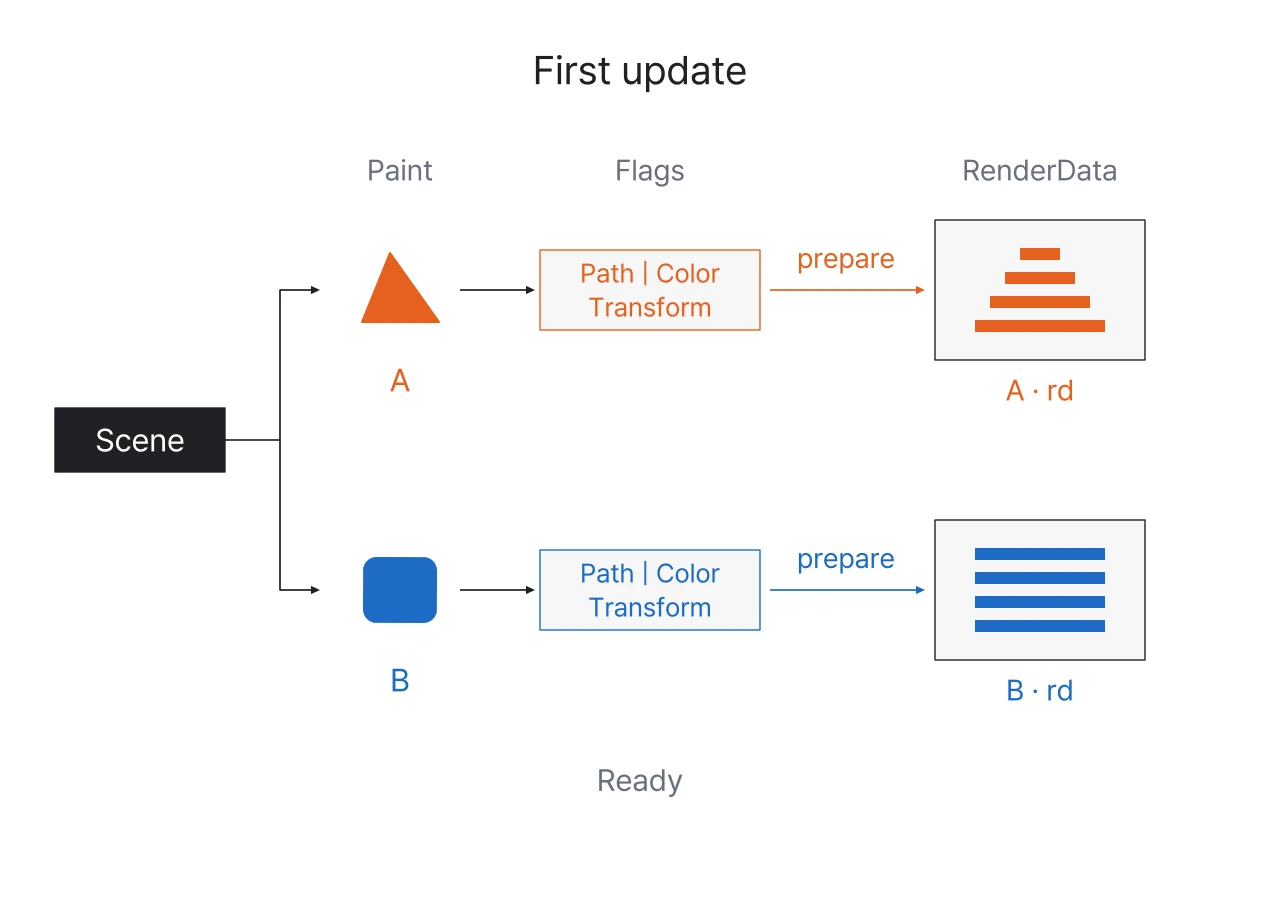
Path와 fill 설정은 Path | Color를, Scene에 추가하는 과정은 Transform을 표시합니다. A·B 모두 RenderData가 없으므로 새 SwShapeTask에서 bounds와 RLE를 준비하고, Draw·Sync 뒤에도 다음 프레임에 사용할 Task와 데이터를 유지합니다.
다음 프레임 — A만 회전·확대
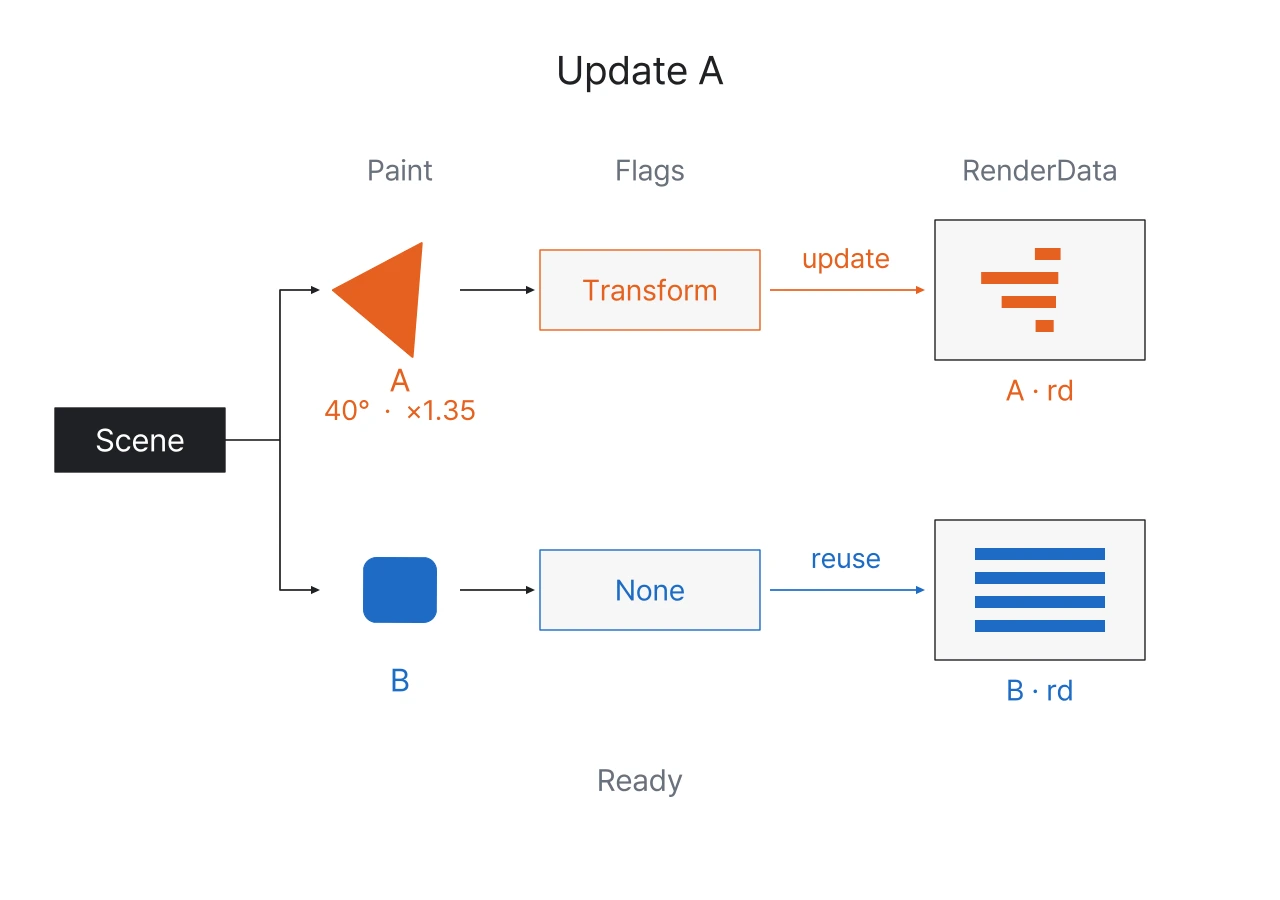
a->rotate(40); a->scale(1.35)은 A에 Transform을 남깁니다. 이 영상에서 부모 Scene의 flag는 None이므로 A만 다시 준비하고, 변경 없는 B는 기존 RenderData를 재사용합니다.
코드 보기: 03. API 변경 · flag 병합 · 선택적 준비
API 예제 — 앞 프레임의 sync() 이후 실행
// A의 Transform만 변경: B의 RenderData는 재사용
a->translate(2, 1);
canvas->update();
canvas->draw(true);
canvas->sync();
호출 흐름
a->translate(2, 1)
-> Paint::Impl::mark(Transform)
-> canvas->update()
-> …
-> Paint::Impl::update(parent flag | local flag)
-> SwShapeTask::run()Paint::Impl::translate(), Paint::Impl::update()
// Paint::Impl::update(): 시작 시 skip 검사, 이후 부모 문맥 병합
PAINT_METHOD(ret, skip((flag | renderFlag)));
if (ret) return rd;

// ... Clip·Mask 준비 구간 생략
opacity = MULTIPLY(opacity, this->opacity);
PAINT_METHOD(ret, update(renderer, pm * tr.m, clips, opacity,
                        (flag | renderFlag), clipper));

// ... 임시 Clip·viewport 복원 구간 생략
renderFlag = RenderUpdateFlag::None;auto updateShape = flags[0] & (RenderUpdateFlag::Path |
RenderUpdateFlag::Transform |
RenderUpdateFlag::Clip);
auto updateFill = flags[0] & (RenderUpdateFlag::Color |
RenderUpdateFlag::Gradient |
RenderUpdateFlag::Transform);SceneImpl::needComposition() 이후 opacity 처리
if (needComposition(opacity)) {
    this->opacity = opacity;
    opacity = 255;
}
1.2. Prepare Task — 실행 단위와 RenderData
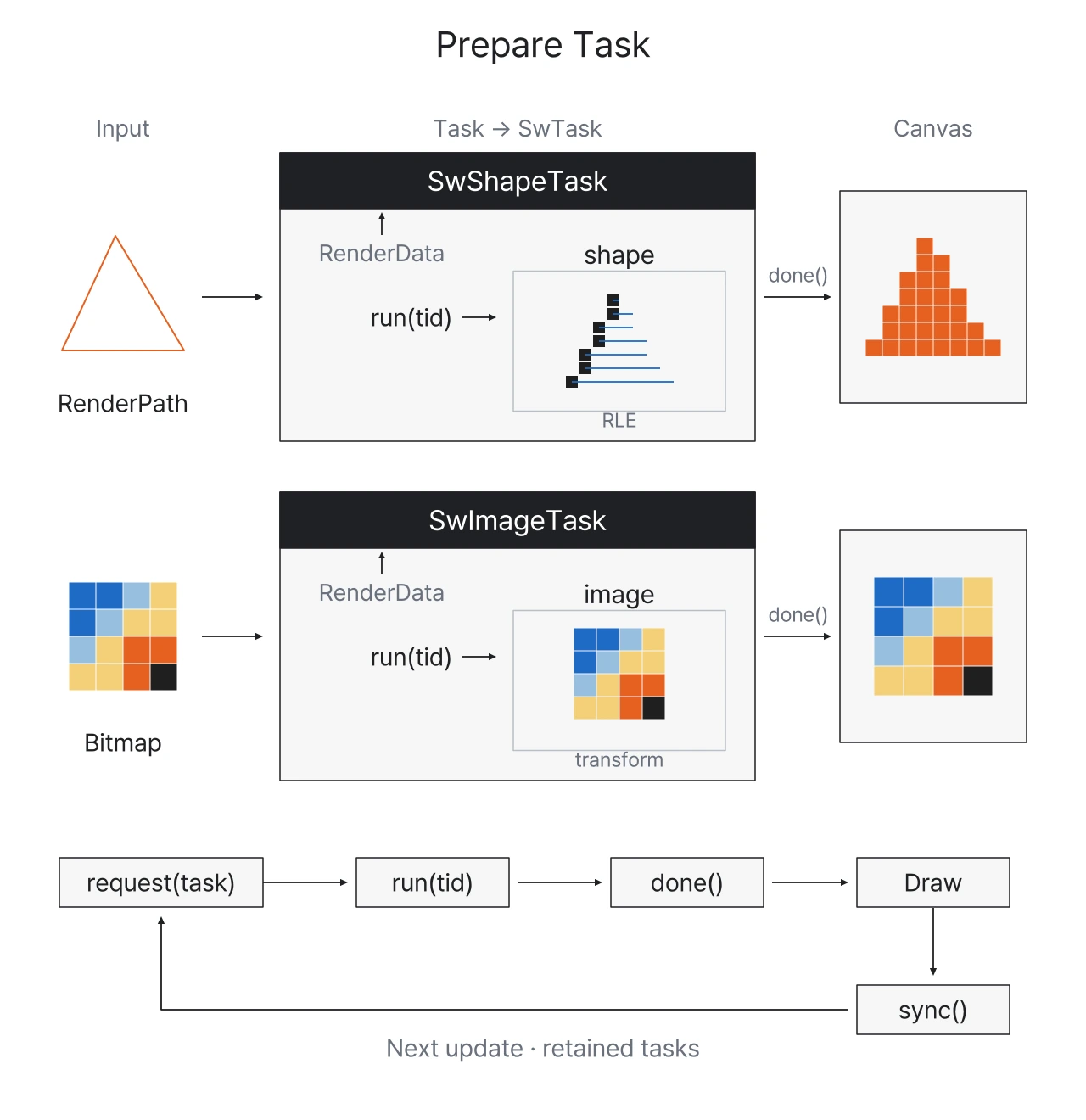
코드 보기: 04. Task 구조 · 요청 · 완료 대기
입력과 준비 결과
using RenderData = void*;

struct SwTask : Task {
    SwRenderer* renderer;
    Matrix transform;
    Array<RenderData> clips;
    // ... bbox, flags, opacity, 상태 필드
};

struct SwShapeTask : SwTask {
    SwShape shape;
    const RenderShape* rshape = nullptr;
    bool clipper = false;
    // ... run(tid), clip(), 소멸자
};

struct SwImageTask : SwTask {
    SwImage image;
    RenderSurface* source;
    // ... run(tid), clip(), 소멸자
};RenderData, SwTask·SwShapeTask·SwImageTask
호출 흐름 — 스레드 지원 빌드의 worker 실행
canvas->update()
-> …
-> SwRenderer::prepare()
-> 기존 task->done() 또는 새 Task 생성
-> prepareCommon(): 상태 설정 · renderer의 tasks에 등록
-> clipper task->done()
-> TaskScheduler::request(task)
-> Task::prepare(): ready = false, pending = true
-> worker queue
-> Task::operator()(tid)
-> SwShapeTask::run(tid) / SwImageTask::run(tid)
-> ready = true · cv.notify_one()

canvas->draw(true)
-> …
-> SwRenderer::renderShape(data) / renderImage(data)
-> task->done()
-> task->shape / task->image를 읽어 RasterprepareCommon()의 제출은 준비가 필요한 flag가 남아 있을 때 수행합니다. SwTask::ready(condition)은 생략 조건을 판단하는 메서드이며, worker 완료를 나타내는 Task::ready 필드와 별개입니다.
// Task::done() — THORVG_THREAD_SUPPORT
void done()
{
    if (!pending) return;

    unique_lock<mutex> lock(mtx);
    while (!ready) cv.wait(lock);
    pending = false;
}prepareCommon()과 두 prepare() overload, TaskSchedulerImpl::request(), Task::done()·완료 알림, SwRenderer::sync()
2. 타입별 RenderData
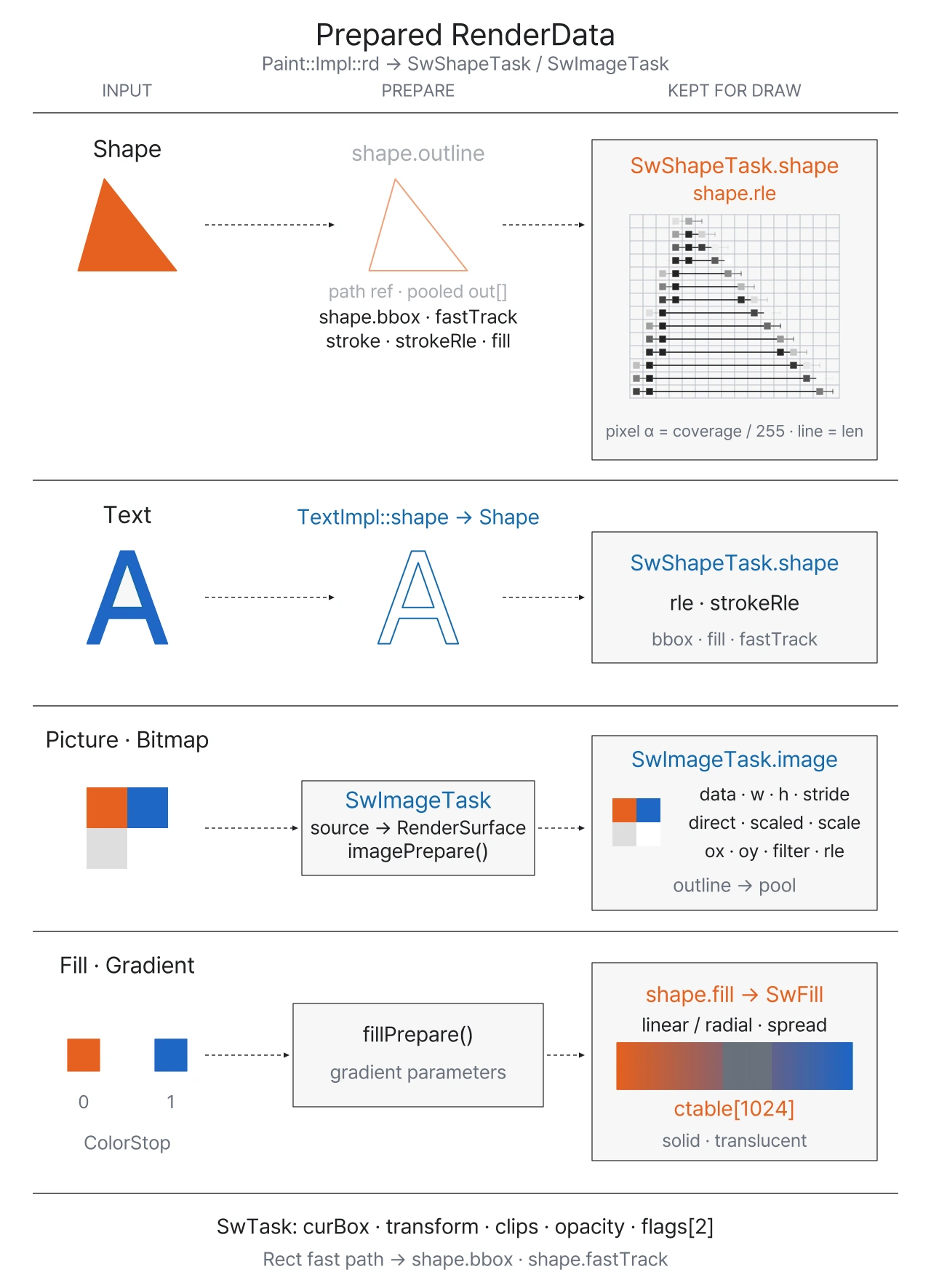
- Shape · Text: 일반 경로는 RLE를 보관합니다. 영상의 시작 픽셀은 alpha로 coverage를, 중심에서 뻗는 선은
len을 나타냅니다. Rect fast path는 fill RLE 없이 bbox를 사용합니다. - Bitmap:
source는 원본RenderSurface를 참조하고,image는 픽셀 데이터 참조·변환 분류·offset·filter·선택적 RLE를 보관합니다. - Gradient:
SwFill에 gradient 매개변수와 1,024개 색상 항목을 준비합니다. Outline·Cell은 준비 중 사용하는 임시 데이터입니다.
| 소유 구조 | 실제 멤버 | Draw에서 사용할 내용 |
|---|---|---|
공통 SwTask | curBox, transform, clips, opacity, flags[2] | 렌더 영역·누적 변환·Clip·불투명도·갱신 상태 |
Shape · Text의 SwShapeTask::shape | rle, strokeRle, bbox, fastTrack, fill, stroke | Fill·Stroke coverage와 스타일, Rect 최적화 정보 |
Bitmap의 SwImageTask::image | data, w, h, stride, direct, scaled, scale, ox, oy, filter, rle | 원본 화소 접근과 sampling 경로, Clip coverage |
Gradient의 SwFill | linear / radial, ctable[1024], spread, solid, translucent | Gradient 좌표 계산과 색상 조회 |
코드 보기: RenderData — 실제 멤버 선언
메서드를 제외한 멤버 선언입니다. outline은 Pool에서 제공하는 임시 Outline을 가리킵니다.
SwTask · SwShapeTask · SwImageTask
struct SwTask : Task
{
    SwRenderer* renderer;
    RenderRegion clipBox;      //clipping region applied to the task, may differ from curBox which is the actual rendering region
    RenderRegion curBox{};     //current rendering region
    RenderRegion prvBox{};     //previous rendering region
    Matrix transform;
    Array<RenderData> clips;
    RenderDirtyRegion* dirtyRegion;
    RenderUpdateFlag flags[2] = {RenderUpdateFlag::None, RenderUpdateFlag::None};  //cur&prv
    uint8_t opacity;
    bool pushed : 1;                  //Pushed into task list?
    bool disposed : 1;                //Disposed task?
    bool nodirty : 1;                 //target for partial rendering?
    bool valid : 1;
};

struct SwShapeTask : SwTask
{
    SwShape shape;
    const RenderShape* rshape = nullptr;
    bool clipper = false;
};

struct SwImageTask : SwTask
{
    SwImage image;
    RenderSurface* source;                //Image source
};struct SwShape
{
SwOutline* outline = nullptr;
SwStroke* stroke = nullptr;
SwFill* fill = nullptr;
SwRle* rle = nullptr;
SwRle* strokeRle = nullptr;
RenderRegion bbox; //Keep it boundary without stroke region. Using for optimal filling.
bool fastTrack = false; //Fast Track: axis-aligned rectangle without any clips?
};
struct SwRle
{
Array<SwSpan> spans;
};
struct SwSpan
{
int32_t x, y;
int32_t len;
uint8_t coverage;
};struct SwImage
{
SwOutline* outline = nullptr;
SwRle* rle = nullptr;
union {
pixel_t* data; //system based data pointer
uint32_t* buf32; //for explicit 32bits channels
uint8_t* buf8; //for explicit 8bits grayscale
};
uint32_t w, h, stride;
int32_t ox = 0; //offset x
int32_t oy = 0; //offset y
float scale;
uint8_t channelSize;
FilterMethod filter;
bool direct = false; // draw image directly (with offset)
bool scaled = false; // 축에 나란한 확대·축소 여부. 가로·세로 배율은 달라도 됩니다.
bool alphaIgnored = false; // If true, the alpha channel can be ignored.
};struct SwFill
{
struct SwLinear {
float dx, dy;
float offset;
};
struct SwRadial {
float a11, a12, a13;
float a21, a22, a23;
float fx, fy, fr;
float dx, dy, dr;
float invA, a;
};
union {
SwLinear linear;
SwRadial radial;
};
uint32_t ctable[SW_COLOR_TABLE];
FillSpread spread;
bool solid = false; //solid color fill with the last color from colorStops
bool translucent;
};Bitmap — Direct · Scaled · Transformed
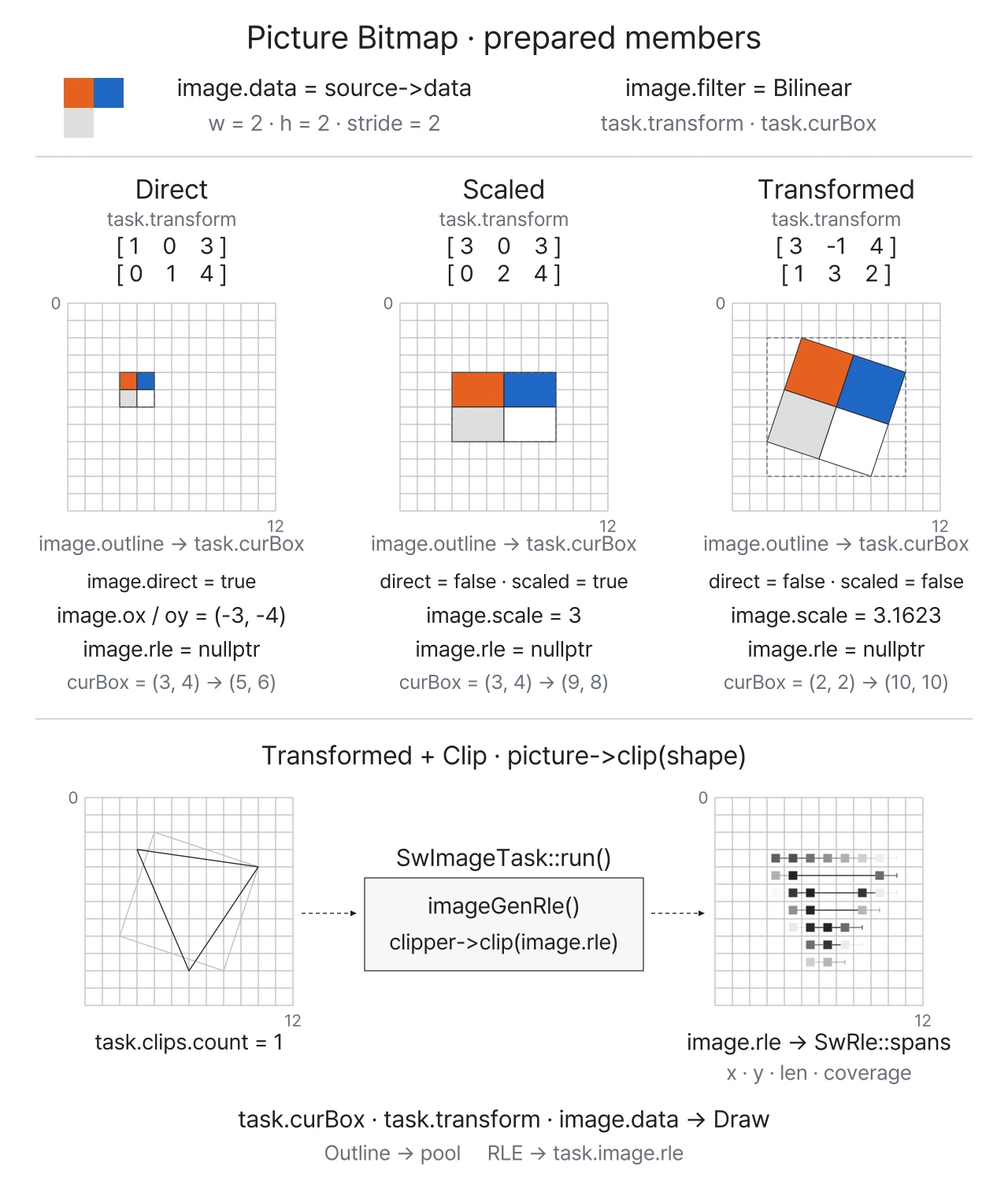
imagePrepare()는 변환된 Outline과 task.curBox를 준비합니다. 원본 화소를 참조하는 image.data는 유지되며, 픽셀 sampling은 이후 Draw에서 수행합니다.
- Direct: 이동만 있으면
direct = true, 원본 화소 접근에 사용할ox·oy를 준비합니다. - Scaled: 축에 나란한 확대·축소는
scaled = true와scale을 준비합니다. 영상처럼 가로·세로 배율이 달라도 이 경로에 해당합니다. - Transformed: 회전·기울임이 있으면
direct = false,scaled = false입니다. Clip이 없는 세 예제 모두image.rle = nullptr입니다. - Clip: 삼각형 Clip은
task.clips에 등록됩니다.imageGenRle()와clipper->clip()을 거친 coverage span은image.rle에 보관됩니다.
SwImageTask::run(), imagePrepare(), renderImage()
준비가 끝난 RenderData를 Surface에 기록하는 다음 경계는 Draw/Raster입니다.
Appendix. Scene Effect — 파라미터 준비
SceneImpl::update()는 자식 Paint의 Update 호출 뒤 Effect 목록을 순회하고, renderer->prepare(effect, transform)으로 누적 Transform을 전달합니다. 실제 픽셀 처리는 다음 draw()에서 자식 Raster 이후에 수행합니다.
- 실행: Effect의
prepare()는 호출 스레드에서 직접 실행하며, 별도의TaskScheduler::request()를 사용하지 않습니다. 자식의 Prepare Task는 이때 아직 실행 중일 수 있습니다. - 보관: Blur·Shadow의
effect->rd는 커널·offset 같은 Effect용 데이터입니다.SwShapeTask·SwImageTask를 가리키는 Paint의rd와 용도가 다릅니다.
| Effect | Update에서 준비하는 내용 |
|---|---|
| GaussianBlur | Transform의 scale을 반영한 box kernel 반경·확장량과 valid |
| DropShadow | Blur kernel·확장량, Transform을 반영한 그림자 offset과 valid |
| Fill | valid = true |
| Tint | intensity > 0인지 확인해 valid 설정 |
| Tritone | blender < 255인지 확인해 valid 설정 |
코드 보기: Appendix. Scene 순회 · Effect prepare
호출 흐름
canvas->update()
-> Canvas::Impl::update()
-> Paint::Impl::update()
-> SceneImpl::update()
-> 자식 Paint의 update() 순회
-> effects 순회
-> SwRenderer::prepare(effect, transform)
-> effectGaussianBlurUpdate() / effectDropShadowUpdate() 등bool update(RenderMethod* renderer, const Matrix& transform,
Array<RenderData>& clips, uint8_t opacity,
RenderUpdateFlag flag, TVG_UNUSED bool clipper)
{
if (paints.empty()) return true;
if (needComposition(opacity)) {
/* Overriding opacity value. If this scene is half-translucent,
It must do intermediate composition with that opacity value. */
this->opacity = opacity;
opacity = 255;
}
//allow partial rendering?
auto recover = fixed ? renderer->partial(true) : false;
// 1. 자식 Paint를 Update합니다. Prepare Task가 요청될 수 있습니다.
for (auto paint : paints) {
PAINT(paint)->update(renderer, transform, clips, opacity, flag, false);
}
//recover the condition
if (fixed) renderer->partial(recover);
// 2. Effect 목록을 순회하며 같은 transform으로 파라미터를 직접 준비합니다.
if (effects) {
ARRAY_FOREACH(p, *effects) {
renderer->prepare(*p, transform);
}
}
// 3. Scene의 viewport와 갱신 영역을 기록합니다.
vport = renderer->viewport();
if (fixed) {
auto pt = fsize * transform;
vport.intersect({{int32_t(round(transform.e13)), int32_t(round(transform.e23))},
{int32_t(round(pt.x)), int32_t(round(pt.y))}});
} else {
vdirty = true;
}
//bounds(renderer) here hinders parallelization
//TODO: we can bring the precise effects region here
if (fixed || effects) impl.damage(vport);
return true;
}SwRenderer::prepare(RenderEffect*, …)
void SwRenderer::prepare(RenderEffect* effect, const Matrix& transform)
{
    // Effect 전용 overload: Task 제출 없이 각 Update 함수를 호출합니다.
    switch (effect->type) {
        case SceneEffect::GaussianBlur:
            effectGaussianBlurUpdate(static_cast<RenderEffectGaussianBlur*>(effect), transform);
            break;
        case SceneEffect::DropShadow:
            effectDropShadowUpdate(static_cast<RenderEffectDropShadow*>(effect), transform);
            break;
        case SceneEffect::Fill:
            effectFillUpdate(static_cast<RenderEffectFill*>(effect));
            break;
        case SceneEffect::Tint:
            effectTintUpdate(static_cast<RenderEffectTint*>(effect));
            break;
        case SceneEffect::Tritone:
            effectTritoneUpdate(static_cast<RenderEffectTritone*>(effect));
            break;
        default: break;
    }
}
Effect별 준비 함수: GaussianBlur, DropShadow, Fill, Tint, Tritone.
이후 draw()에서는 Offscreen에 자식을 그린 뒤 valid인 Effect를 등록 순서대로 실행하고 endComposite()로 합성합니다. Effect별 계산과 픽셀 처리 과정은 Compositing & Postprocessing의 Effect Details에서 이어집니다.